Plugin Greenieboard
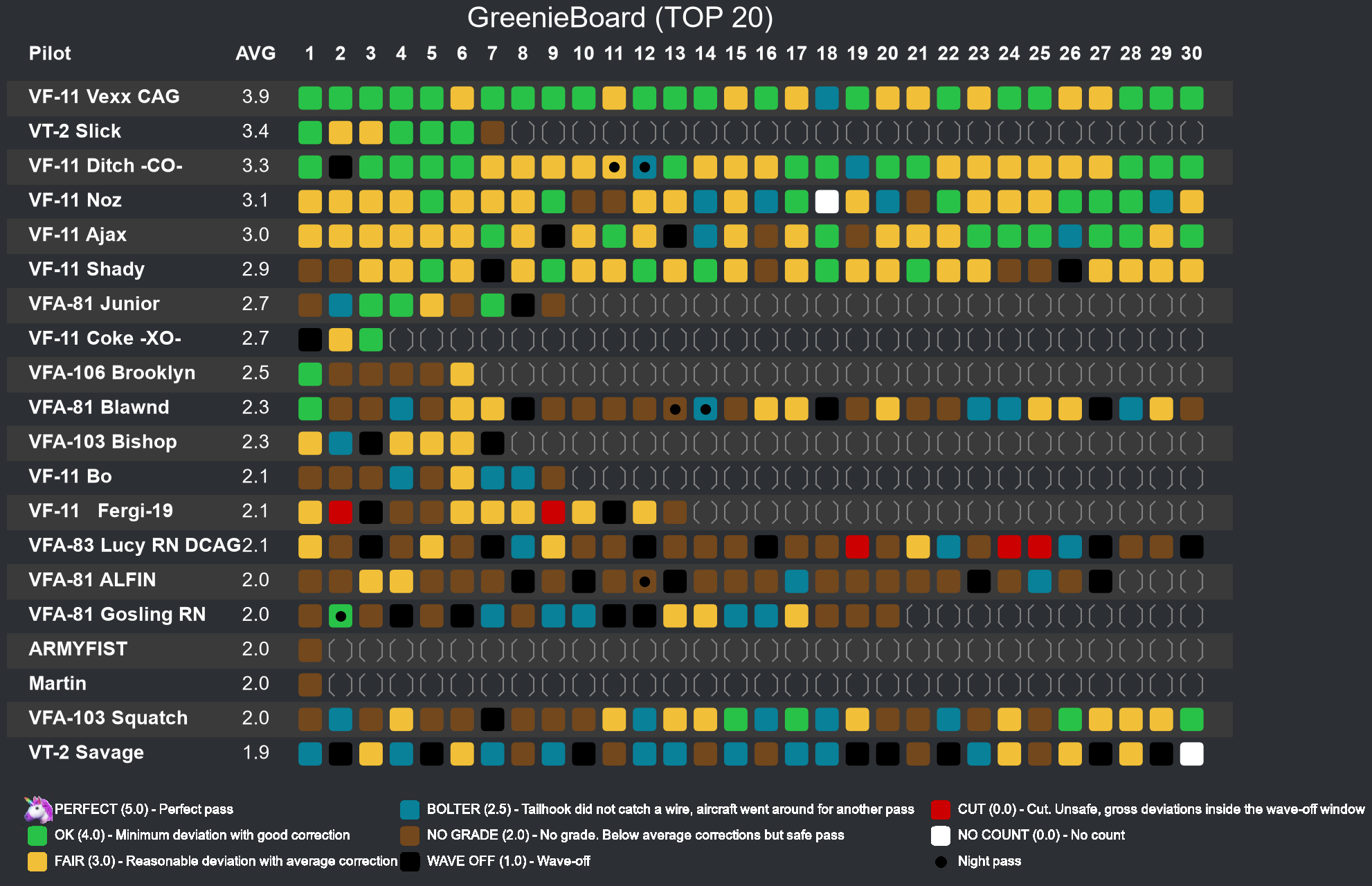
This plugin allows you to have a (optional: persistent) greenieboard for the top x (default: 10) players and to give players the opportunity to analyse their carrier landings.
Note
The landing quality marks will only be generated for landings* on the DCS Super Carrier module unless you use MOOSE AIRBOSS (see below). missionstats have to be enabled for your server.**
*Not all landings generate a mark for whatever reason and some are off from what you might have experienced in game.
Moose AIRBOSS Integration (Optional)
You can integrate your LSO comments and trapsheets generated by Moose AIRBOSS into DCSServerBot.
To do so, follow the configuration example below. DCSServerBot will detect your landings and generate the needed
information for players, so that you can check out your landings with the /traps info command.
The included trapsheet-graphs are taken from HypeMan, so credits go to Rob <3!
I can't do a full Moose AIRBOSS documentation here, you guys want to look at this
link instead. To use the
full capabilities of DCSServerBot, I would expect that you save Trapsheet data in addition to the normal LSO comments.
Both are being stored in CSV files, usually somewhere below your Saved Games\
Note
Moose.AIRBOSS stores a CSV file for every trap in the "basedir" you configured for your servers. You can add the directory to your Cleanup-service to get rid of these files after a while.
Code Changes
To integrate DCSServerBot into your lua code using Moose AIRBOSS, you need to send the following structure to the bot after the trapsheet is written to disk:
local airboss=AIRBOSS:New("CVN-73", "CVN-73")

function airboss:OnAfterLSOGrade(from, event, to, playerData, myGrade)
    player_name = playerData.name:gsub('[%p]', '')
    [...] -- do some magic in here, like SH break, etc.
    trapsheet = "AIRBOSS-trapsheet-" .. player_name
    airbossWashington:SetTrapSheet(nil, trapsheet)
    [...]
    self:_SaveTrapSheet(playerData, myGrade)

    msg = {}
    msg.command = "onMissionEvent"
    msg.eventName = "S_EVENT_AIRBOSS"
    msg.initiator = {}
    msg.initiator.name = playerData.name
    msg.place = {}
    msg.place.name = myGrade.carriername
    msg.points = myGrade.points
    msg.grade = myGrade.grade
    msg.details = myGrade.details
    msg.case = myGrade.case
    msg.wire = playerData.wire
    msg.trapsheet = trapsheet
    msg.time = timer.getTime()
    dcsbot.sendBotTable(msg)
end
FunkMan Integration (Optional)
The developers of Moose were so kind to align their new way of sending trap data from DCS via UDP with me, so we could generate events, that are compatible with DCSServerBot! To use this option, you currently need to download and link FunkMan, but you don't need to run it. I just use some rendering stuff from there for convenience reasons and just because they are nice and funkyfranky put a lot of effort in already. A true community collaboration though! For enabling the FunkMan functionality, you need to enable that in your Moose lua code (samples yet to come, see Moose documentation for now) and you need to link the place where you downloaded FunkMan to your greenieboard.json (see below).
Configuration
As GreenieBoard is an optional plugin, you need to activate it in main.yaml first like so:
opt_plugins:
  - greenieboard
The plugin comes as many other plugins with a yaml configuration. If you don't generate your own config, DCSServerBot will just copy over the sample by itself and use that one. This will do it for the most users, if you don't plan to use the persistent mode.
Anyway, this is how the configuration will look like. For now, there is only a default config, so you can't generate different greenieboards for different servers. If that is a user demand in the future, I might add it.
# config/plugins/greenieboard.yaml
DEFAULT:
  num_landings: 5           # display the last 5 landings
  num_rows: 10              # display 10 players
  theme: light              # one of 'dark' or 'light' (default: dark)
  landings_rtl: false       # draw landings right to left (default: True)
  persistent_board: false   # if true, a persistent board will be uploaded into persistent_channel
  persistent_channel: 123456789 # in which channel to post the board
  squadrons:
    - name: 'My Fancy Squadron 1' # Optional: display boards for these squadrons
    - name: 'My Fancy Squadron 2'
  grades:
    _OK_: {rating: 5, grade: 'Perfect pass', legend: 'PERFECT'}
    OK: {rating: 4, grade: 'Minimum deviation with good correction', color: '#29C248', legend: 'OK'}
    (OK): {rating: 3, grade: 'Reasonable deviation with average correction', color: '#F2C038', legend: 'FAIR'}
    B: {rating: 2.5, grade: 'Tailhook did not catch a wire, aircraft went around for another pass', color: '#088199', legend: 'BOLTER'}
    --: {rating: 2, grade: 'No grade. Below average corrections but safe pass', color: '#73481d', legend: 'NO GRADE'}
    WO: {rating: 1, grade: 'Wave-off', color: '#000000', legend: 'WAVE OFF'}
    C: {rating: 0, grade: 'Cut. Unsafe, gross deviations inside the wave-off window', color: '#CC0000', legend: 'CUT'}
    NC: {"rating": 0, "grade": "No count", "color": "#FFFFFF", "legend": "NO COUNT"}
    _n: {color: '#000000', legend: 'Night pass'}
  credits: true                   # People should get credits for their landings (see CreditSystem)
  min_flight_time: 600            # Minimum flight time in seconds to be considered as valid for the board (default: 600)
  Moose.AIRBOSS:
    basedir: airboss              # Trapsheets will be stored in Saved Games\<instance>\airboss
  FunkMan:                        # if you want to use the FunkMan integration
    IMAGEPATH: ../FunkMan/funkpics/
    install: ../FunkMan
DCS.dcs_serverrelease:               # our server uses Moose.AIRBOSS
  num_rows: 5                     # Overwrite the number of rows to display (default: 10)
  Moose.AIRBOSS:
    basedir: airboss              # overwrite the default in here, if you like
    grades: AIRBOSS-{carrier}_LSOGrades.csv
    trapsheets: '*AIRBOSS-{carrier}_Trapsheet-{name}_{unit_type}*.csv'
  FunkMan:
    enabled: false                # We need to disable FunkMan, if we want SC or Moose.AIRBOSS instead
  persistent_board: true          # if true, a persistent board will be uploaded into persistent_channel
  persistent_channel: 123456789   # Optional: in which channel to post the board (default: status channel)
  squadrons:
    - name: 'My Fancy Squadron 1' # Optional: display boards for these squadrons
      channel: 1234567890         # Optional: channel ID (default, persistent_channel above)
    - name: 'My Fancy Squadron 2'
      channel: 9876543210
Discord Commands
| Command | Parameter | Channel | Role | Description |
|---|---|---|---|---|
| /traps board | rows landings theme landings_rtl | all | DCS | Print the current greenieboard (per server). 10 rows is default, so is 30 landings. Can be changed with the parameters. |
| /traps info | [user] | all | DCS | Display the last carrier landings for this user and a detailed view on selection. User is the caller if not provided. |
| /traps add | user | all | DCS Admin | Adds a trap for this user (manual data input). |
| /traps clear | [user] | admin | DCS Admin | Wipes all traps (optional: of a user). |
Highscore Plugin
You can add your traps to your .highscore (.hs) command. To do that, copy the file plugins/userstats/reports/highscore.json to /reports/userstats and add or replace the following snippet (change col and row to your position in the chart):
            {
              "class": "plugins.greenieboard.reports.HighscoreTraps",
              "params": { "col": 1, "row": 4, "include_bolters": true, "include_waveoffs": true }
            }
Configuration reference
| Key | Type | Description | Example |
|---|---|---|---|
DEFAULT |
map | |
|
commands |
|
||
chat_commands |
|
DEFAULT
| Key | Type | Description | Example |
|---|---|---|---|
DEFAULT.num_landings |
int | Number of most recent landings shown per player. (range: min 1, max 30) | 5 |
DEFAULT.num_rows |
int | Number of players shown on the greenieboard. (range: min 1, max 20) | 10 |
DEFAULT.theme |
str | Color theme used to render the board image. (one of: light, dark) | light |
DEFAULT.landings_rtl |
bool | Draw landings right to left instead of left to right. | false |
DEFAULT.persistent_board |
bool | Keep a persistent board posted in the channel. | false |
DEFAULT.persistent_channel |
int | Discord channel that hosts the persistent board. | 123456789 |
DEFAULT.credits |
bool | Award credit points for carrier landings. | true |
DEFAULT.min_flight_time |
int | Minimum flight time in seconds for a valid landing. | 600 |
DEFAULT.squadrons |
list | Per-squadron boards with their own display channel. | - name: My Fancy Squadron 1 |
DEFAULT.squadrons[].name |
str | Name of a squadron to display a board for. (range: min 1) | My Fancy Squadron 1 |
DEFAULT.squadrons[].channel |
int | Channel the squadron board is posted to. | 1234567890 |
DEFAULT.grades |
map | LSO grade definitions keyed by the DCS grade symbol. | OK: |
DEFAULT.grades.<(\_OK\_\|OK\|\(OK\)\|B\|\-\-\|WO\|C\|NC\|_n)> |
map | |
|
DEFAULT.grades.<(\_OK\_\|OK\|\(OK\)\|B\|\-\-\|WO\|C\|NC\|_n)>.rating |
float | Numeric score used to rank this landing grade. (range: min 0.0) | 5 |
DEFAULT.grades.<(\_OK\_\|OK\|\(OK\)\|B\|\-\-\|WO\|C\|NC\|_n)>.grade |
str | Full description of the landing grade. (range: min 1) | Perfect pass |
DEFAULT.grades.<(\_OK\_\|OK\|\(OK\)\|B\|\-\-\|WO\|C\|NC\|_n)>.color |
str | Hex color used to color this grade on the board. (range: min 1) | #29C248 |
DEFAULT.grades.<(\_OK\_\|OK\|\(OK\)\|B\|\-\-\|WO\|C\|NC\|_n)>.legend |
str (required) | Short label shown in the board legend. (range: min 1) | PERFECT |
DEFAULT.Moose.AIRBOSS |
map | Moose AIRBOSS integration for trapsheets and grades. | basedir: airboss |
DEFAULT.Moose.AIRBOSS.basedir |
str | Folder where Moose AIRBOSS writes its trapsheets. (range: min 1) | airboss |
DEFAULT.Moose.AIRBOSS.grades |
str | Filename pattern for the LSO grade CSV files. (range: min 1) | AIRBOSS-{carrier}_LSOGrades.csv |
DEFAULT.Moose.AIRBOSS.trapsheets |
str | Filename pattern for the trapsheet CSV files. (range: min 1) | AIRBOSS-{carrier}Trapsheet-{name}.csv |
DEFAULT.FunkMan |
map | FunkMan integration for rendering grade graphics. | install: ../FunkMan |
DEFAULT.FunkMan.install |
str | Path to your FunkMan installation directory. (range: min 1) | ../FunkMan |
DEFAULT.FunkMan.IMAGEPATH |
str | Directory holding the generated FunkMan images. (range: min 1) | ../FunkMan/funkpics/ |
<(.+)>
| Key | Type | Description | Example |
|---|---|---|---|
<(.+)> |
any | (one of: element_schema, instance_schema) | |