Player linking
To use in-game commands, a DCS player has to be matched to a Discord user. A matched player sees their own statistics in Discord, and everything the bot records per player hangs off that link.
/linkme — the reliable way
- The player runs
/linkmein Discord and receives a 4-digit TOKEN as a private message. - They type it into the in-game chat of one of your servers:
-linkme 1234(the prefix is yourchat_command_prefix,-by default). - The link is verified and permanent.
The token expires after two days. Running /linkme again on an already verified account asks
whether you really want to re-link — the typical reason is switching from Steam to the standalone
DCS version.
Admins can break a link with /unlink <player> (role: DCS Admin).
Auto-matching — convenient, not always right
With automatch: true in config/services/bot.yaml the bot tries to match a DCS player name to a
Discord username on its own. It works best when both names are identical, and it can produce false
links — which is why it is off by default. /linkme is the method to recommend.
If your community uses tags in player names, name the tag pattern in config/main.yaml under
filter.tag: the bot strips it before comparing.
What a linked player sees
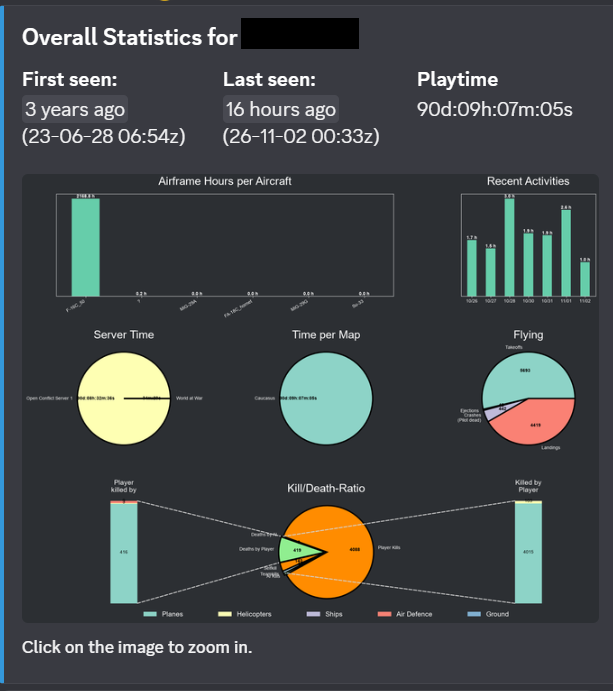
Everything the bot records hangs off the link, and the statistics command renders it as one image:
What depends on it
- in-game chat commands work only for linked players
- statistics, logbook, credits and greenieboard entries are keyed on the UCID
autorolecan hand out a role the moment a player is linked (roles.linkedinconfig/services/bot.yaml)
An unlinked player is not blocked from the server — they simply have no statistics and no chat commands.